Showing posts with label apple. Show all posts

Monday, January 26, 2015

How to outsource your life

These days, there's an app for EVERYTHING. If money were no object, you wouldn't actually have to leave your house. You can have someone come over to give you a manicure, ship a package, even bring you pot! It's gotten a little nuts. Here's a round-up of services you can get...

Shyp for sending packages. (No more post office lines!)

Instacart for groceries (Whole Foods, Costco, etc.)

Seamless for restaurant delivery.

Minibar for alcohol.

Good Eggs for farmer's market goods.

UrbanStems or BloomThat for flower delivery.

Kitchensurfing for personal chefs.

Homepolish for interior decorating.

Washio for laundry and dry cleaning.

Priv for manicures and beauty treatments at home.

Glamsquad for blow outs at home.

Zeel or Soothe for at-home massages.

Lyft for rides; Hailo for cabs; Bandwagon for airport rides.

Spike for motorcycle sharing.

Handy for handymen and home cleaning.

TaskRabbit for random tasks.

Postmates for delivery of pretty much anything.

UrbanSitter for babysitters.

GotIT! for tutoring.

Friday, March 21, 2014

Six clever items to simplify your life

Align

Unlike the standard stapler, which is limited by length, this unique version makes it easy to staple materials of any size or shape. Need a staple in the center of the page? Simply detach the magnetic base, line up the two halves, and press.
To buy: $10, quirky.com.

CoverMate Stretch-to-Fit Food Covers

This microwavable food-safe cover stretches to fit over any ramekin, bowl, or platter so you can save or transport your culinary creations with ease. Reuse up to 10 times.
To buy: $4 for 10, target.com.

Easy Walk Harness

If your pup thinks he’s taking you for a walk (read: pulling on the leash), slip this harness on him. The leash attachment is on the chest rather than the collar, which makes it easy to control and steer your dog without putting pressure on his neck.
To buy: $27, petsafe.net.

Wooden Mounted Wall Caddy

Short on counter space? Instead of cramming all of your toiletries under the sink, hang this artful caddy on the wall to cleanly stow toothbrushes, cotton balls, and more.
To buy: $74, uncommongoods.com.

EZ Squeezees

Fill these reusable pouches with yogurt, apple sauce, and other purees for a convenient and mess-free way to snack on the go. To reuse, rinse under hot water or place in the dishwasher.
To buy: $10 for three, ezsqueezees.com.

Dual Camera

Whether you’re touring a new city or simply enjoying a group dinner, share the whole experience by taking two photos—one of what you’re seeing (using your smartphone’s regular camera) and one of yourself (using the front-facing camera). The free app then combines the two photos into a single shareable image.


Source

Wednesday, March 19, 2014

NailSnaps makes custom nail art out of your instagram pictures


This is one fail-safe way to make sure no one has the same nail art as you.

NailSnaps is an app that will let you import your own Instagram photos to create unique, one-of-a-kind nail stickers. The app lets you arrange the photo to either create a continuous image across the nails, or zoom-in on one part of your photo and have it repeat on each fingernail.

NailSnaps is the brainchild of LA-based designers Angel Anderson and Sarah Heering, who put the project up on KickStarter to raise $47,381. With 18 days left in their campaign, they have over $36,000 dollars left to bring in. As with all Kickstarter projects, if they don't raise their goal by the deadline, they get none of the money that others have pledged.

We (selfishly) hope their Kickstarter succeeds. Usually, we fans of nail art have to either shell out tons of money for expertly-crafted custom designs or walk around with sad, self-painted approximations of things we saw on Pinterest.

But thanks to NailSnaps, all we need to be good at is taking a decent Instagram pic, which isn't that hard thanks to filters and ever-improving smartphone camera lenses.

Anderson and Heering have included prototypes like palm trees, keyboards and bridal lace on their Kickstarter page.

Sunday, March 16, 2014

A good reason to put down your smartphone


In this age of the ever-present smartphone and our 'always on' lifestyle, requesting that people leave their phone alone for even a brief span of time is a hard thing to ask, but in this case, instead of harping on the lack of manners that some gadget addicts display, you can point out the potential benefit to others that doing so can have.

As part of the UNICEF Tap Project, people are being challenged to give up something they take for granted, their cellphones, in order to help supply something that's not taken lightly in many parts of the world, which is access to clean drinking water.

If you can put down your phone for just 10 minutes and leave it untouched the whole time (I know, it's rough), Giorgio Armani, the current sponsor of the Tap Project, will donate enough money to pay for a day's worth of safe water for a child in need.
"UNICEF Tap Project is working to help the 768 million people around the world without access to clean water. This year you can help by taking a challenge to give up access to something far less vital than water–your cell phone. 
For every 10 minutes you don’t touch your phone, our sponsor can provide one day of clean water for a child in need."
Ready to begin? All you have to do is use your phone to navigate to the UNICEF Tap Project, follow the prompts, and then set your phone down and do something else constructive for just 10 minutes. The site accesses the accelerometer in your phone to determine if you're actually leaving it alone for the whole time, and if you move the phone, it asks you to put it down to continue.

While you're waiting to get back onto Instagram or Facebook, a timer is displayed on the mobile site, along with a series of water messages and comparisons that put things in perspective for those of us who've got no problem with getting clean drinking water every day of the week.

So go ahead. Put down your phone and help fund clean safe drinking water for a child in need.

Source

Wednesday, March 12, 2014

Bacon-scented alarm clock

If your alarm clock just isn’t doing the trick to wake you up anymore, perhaps you’ll need to tap into another of your five senses: smell. And what’s the absolute, indisputable best smell in the world? Bacon, obviously.

Oscar Mayer, the American meat company famous for its wieners, created a device that turns your smartphone into a kitchen with a bacon-scented alarm clock. A small device is simply plugged into the headphone jack of an iPhone and connected to an app that allows users to emit the sounds and smells of fresh-cooked bacon.

The Kraft-owned company said “Wake Up & Smell The Bacon” will be available on the site from March 3 until April 4, 2014. However, it’s not for sale; those who desire a bacon-scented alarm clock must fill out an application and will only receive the device if they are chosen. Anyone could download the iPhone alarm app, though, which emits the sound of cooking bacon.

"With nearly two million mentions of #bacon on Instagram, it seems people never get tired of bacon. That’s why our team decided to develop a device to give folks what they long for most," Tom Bick, senior director of integrated marketing and advertising at Oscar Mayer, said in a statement. “As the category leader, Oscar Mayer is thrilled to bring the first-ever, bacon-scented mobile device to market, giving bacon aficionados a new reason to welcome their morning alarm clocks."

Oscar Mayer also released an epic video advertisement to promote the bacon alarm clock, with a nymph-like woman roaming a forest with the “finest” aroma discharging from bacon flowers. The latest invention comes from the Oscar Mayer Institute for the Advancement of Bacon, which dubs itself the "consortium of the world's greatest bacon minds dedicated to unlocking the bacon's deepest mysteries for the benefit of bacon lovers everywhere."

Source

Tuesday, March 11, 2014

Apple releases new operating software

The long-awaited iOS 7.1 update is now available. While this is a point release, Apple has made several tweaks to the iOS user interface, alongside the usual bug fixes and some feature additions. The main visual changes can be found in the phone dialer and power off features. iOS 7.1 switches to rounded UI elements in both of these areas, and the incoming call interface now includes separate decline and accept buttons below floating circular icons for the Remind Me and Message options.

Other UI tweaks are fairly minor, including a slight music app refresh with prominent repeat and shuffle icons, and the option to disable wallpaper motion when selecting an image. iOS 7.1 also includes improvements to the keyboard interface, making the shift and delete keys easier to see. Perhaps the best visual tweak in iOS 7.1 is a change to the Notification Center, which appears to allow you to clear notifications more accurately.

IOS 7.1 FINALLY FIXES THE RANDOM REBOOTS
Aside from the visual tweaks, iOS 7.1 finally includes a fix for something you hopefully won't see anymore: random reboots that iPhone 5S, iPad mini with Retina display, and iPad Air users have been experiencing. Apple promised a fix in January, and the issues have existed since the launch of iOS 7, causing some devices running the latest OS to randomly reset for no apparent reason. Some iPhone 5S users have also complained of Touch ID issues, and Apple has tweaked the recognition to make it faster and more accurate in the latest update. If you're stuck on an iPhone 4 and you've not yet upgraded, Apple has also optimized iOS 7.1 to run faster on iPhone 4 hardware. The same goes for older iPads, like the iPad 2, and third-generation iPad.

CARPLAY IS THE BIG NEW FEATURE FOR IOS 7.1
iOS 7.1 also includes support for Apple’s new CarPlay feature. Known previously as iOS in the Car, CarPlay is built primarily around the use of Siri voice commands and prompts, providing an "eyes-free" experience where you can respond to incoming calls, dictate text messages, or access your music library from a vehicle. Ferrari, Mercedes-Benz, and Volvo will support CarPlay in some of their new cars at launch, and a broader range of carmakers, including Ford and BMW, are promising to integrate CarPlay with their future in-car entertainment systems.

iTunes Radio has also been tweaked in iOS 7.1, allowing you to search within featured stations and more quickly create new stations based on searches for songs and artists. And for the first time, Apple now lets people subscribe to iTunes Match right from their device, instead of in the desktop version of iTunes. This removes the ads in iTunes Radio, and provides a year of Apple's scan and match music service.

Another change in iOS 7.1 is an adjustment to how Siri is triggered. Siri still activates using the home button, but in iOS 7.1 you can hold the home button down to ensure Siri listens for longer and doesn't cut off any pauses in your query. Overall, the changes are minor, but welcome, additions to an operating system that powers millions of devices. Since releasing iOS 7 back in September, Apple has fixed lock-screen security issues, iMessage problems, FaceTime call drops, and a major security flaw. The latest iOS 7.1 update is available immediately.

Friday, March 7, 2014

Apps you never knew you needed

1. When you feel lost and directionless (and could really use a slice of pizza)…

Pizza Compass is everything you want in life. It literally tells you the closest pizza place. Run! Get that slice!

2. When you want to know the weather (and a little something more)…


Well the weather outside is frightful… but at least we have a cute puppy telling us the weather! Also available in cute kitty form.

3. When you want to know the weather (and WHAT TO WEAR)…

Do I need a sweater? Light jacket? An umbrella? Swackett suggests what you should wear based on the weather. Perfecto.

4. When you really are at a loss for words (because you don’t understand the language)…

iTranslate can translate over 70 different languages for you. A MUST if you are traveling!

5. When you feel you should work out (your brain)…

Your brain muscle needs a good workout every day too! Fulfill your brain potential with Lumosity Mobile. The app creates a personalized training program just for you!

6. When you really just don’t want to hold the phone…


Who likes waiting on the phone? FastCustomer will DO IT FOR YOU. Seriously. Try it out.

7. When you feel like it’s impossible to get out of bed…

Instead of pressing your annoying alarm in the morning, play a GAME instead. TrySmile Alarm and make your mornings a little more delightful.

8. When you gotta go (during a movie)…

When you gotta go, you gotta go! Even if it’s during a movie. Find the best time for a quick run to the loo with this app.

9. When you just wanna pay your bill (with a large group of people)…

Figuring out tax and tip for a large party is a huge pain. Make it simple with Billr. No more upset penny pinchers!

10. When you wanna go to bed (and play games on your phone)…

C’mon! I just wanna play a game in bed, but the screen HURTS MY EYES. Enter Screen Filter. It puts a filter on your phone so it won’t blind you in the dark. Now keep on connecting those dots.

Thursday, November 28, 2013

Seven apps that will make your Thanksgiving so much better

Waze– Avoid Thanksgiving traffic as much as humanly possible

play.google.com

Why you should get it: Waze is a real time traffic app which crowdsources actual drivers to get you to your destination as fast as humanly possible.
Cost: Free on both Apple and Android

Tripit— Keep all of your relatives’ travel itineraries in one place

itunes.apple.com

Why you should get it: Keep all of your confirmation numbers, itineraries, and maps in one place. Plus you can add your relatives’ travel plans to your app so you know exactly when they arrive (and leave.)
Cost: Free on Apple and Android

Heads Up— A super entertaining game to play with your whole family

play.google.com

Why you should get it: Your whole family will love this game. It’s the perfect mix between charades and Catchphrase, but with no prep time. You can even watch back the video of everyone guessing and screaming.
Cost: Apple $0.99 / Android $0.99

Spaceteam— Be antisocial, together with this multiplayer space game


Why you should get it: This game is a hilarious way to break the family tension between Apple and Android users. The idea is simple— stop the space craft from exploding by operating the control panel on your phone. But there’s a catch, everyone has to work together because only one phone has the instructions.
Cost: Free on Apple and Android

OPlayer— Upload your movies to your phone in almost any format

botonhome.es

Why you should get it: Perfect for long flights and car rides. Plus it plays almost all movie formats including MKV and AVI.
Cost: Apple $2.99 / Android $2.97

Black Friday App – Get the best deals without any of the drama

play.google.com

Why you should get it: Black Friday is crazy enough without having to individually sift through every ad. Use this app to filter out exactly what you’re looking for and the best place to get it. And just to be sure you’re getting the best deal, download Amazon’s “Price Check” on Apple or Android to scan a barcode in store and compare prices online.
Cost: Free on both Apple and Android

Evernote Food— Store all of your holiday recipes or find new ones

play.google.com

Why you should get it: Note cards with food spilled all over them are cute, but this is much better. Store your favorite family recipes, look up new ones, and when all else fails… find a good restaurant nearby.
Cost: Free on Apple and Android

Monday, October 7, 2013

Ways to improve your iPhone's battery life with iOS 7

iOS 7 has been out for a few weeks now, and people are torn.

While some of the new features are fabulous, and others are making us crazy, there's one thing we can all agree on: iOS 7 is not helping our battery life. As Ars Technica discovered, iOS 7 kills battery life faster than iOS 6.1 on every device you can use it on. We've got some tips to help you out.

1. Change Your Spotlight Settings
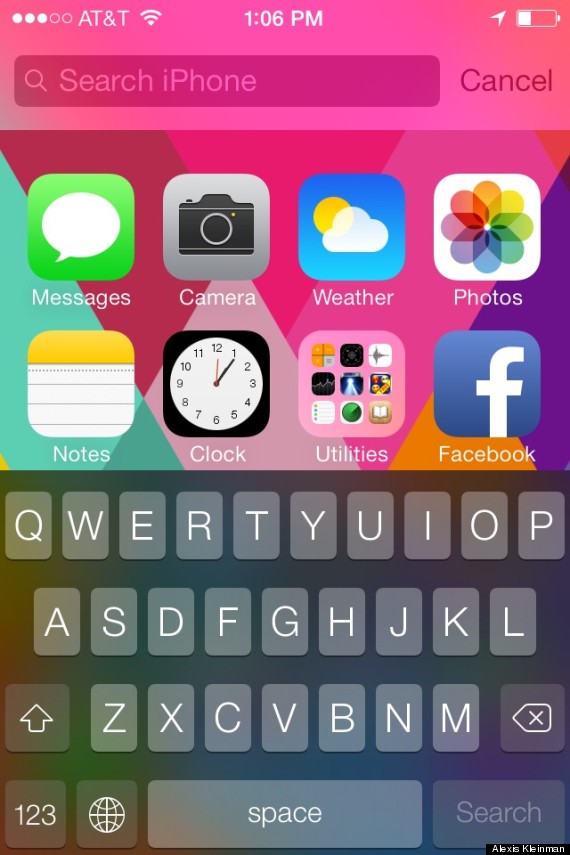
With iOS 7, you can now search for anything on your iPhone using Spotlight. All you have to do is pull down on your Home screen and you can search pretty much every part of your phone, from notes to music, to mail.

It's convenient, but it also takes a lot of battery power to index all of your stuff. You can change exactly what Spotlight looks in when you use it for search by going to Settings, General then Spotlight search. From there you can choose what you want to index and search.

2. Turn Off AirDrop When Possible
iOS 7 now allows you to quickly and easily share files with your friends' iPhones. This is only available for iPhone 5 and newer. It's a great new feature, but it doesn't need to be on when you're not using it. To turn it off, go to your control center by pushing up from the bottom of any screen. From there you can disable AirDrop until you want to use it.

3. Turn Your Brightness Down
This is a classic way to save battery life, and it's been made even easier with iOS 7. Instead of going through Settings to get to your brightness, you can change your screen's brightness from the Control Center. Just pull up from the bottom of any screen.

4. Turn Off Parallax
Remember how people are getting motion sickness from iOS 7? This is one of the reasons why. The aspect of iOS 7 that makes everything look a little bit 3D and makes your background move around behind your apps. It also drains your battery. To turn it off, go to Settings, General, then Accessibility, then Reduce Motion. Turn Reduce Motion on to stop the parallax effect.

5. Turn Off Bluetooth And WiFi
This is another old one, but remember that if you're moving around and not using your WiFi or Bluetooth, these things are using up your battery. You can keep these features off until you want to use them to save some battery. You can turn these on and off in the Control Center.

6. Disable Auto Downloads
Your iPhone now downloads app updates from the App Store automatically, draining your battery. This feature also automatically downloads purchases from iTunes and the App Store you've made on different devices to your iPhone, which you may not want. To stop this and just update your apps and music manually, go to Settings, iTunes & App Store, and scroll to Automatic Downloads. There you can turn Automatic Downloads off for music, apps and books.

7. Turn Off Frequent Locations
Your iPhone wants to learn the places you often visit to give you "provide useful location-related information." This is takes up a lot of battery life and may also make you feel uncomfortable privacy-wise. To disable it go to Settings, Privacy, then Location Services. There, scroll all the way to the bottom and hit System Services. There you can also turn off Location Based iAds (ads from Apple based on your frequent locations). Then go to Frequent Locations and turn that off, too.

8. Say Goodbye To Siri
Unless you're using Siri regularly, you're better off disabling her to save battery. To do so, go to Settings, General then Siri. Tap Siri and you can turn her off. Sorry, girl!

9. Don't Use A Moving Background
The new moving backgrounds that iOS 7 offers are super cool, but they will totally kill your battery. To change your iPhone's wallpaper, just go to Settings, then Wallpapers & Brightness. Try out one of the beautiful new static wallpapers or use a photo of your own.

Source

Sunday, October 6, 2013

Apple beats Coca Cola as the #1 brand

Apple is the new most valuable brand in the world, according to a closely followed annual report.

The report, to be released on Monday, is from Interbrand, a corporate identity and brand consulting company owned by the Omnicom Group that has been compiling what it calls the Best Global Brands report since 2000. The previous No. 1 brand, Coca-Cola, fell to No. 3.

Not only has Apple replaced Coca-Cola as first among the 100 most valuable brands based on criteria that include financial performance, this is the first time that the soft drink known for slogans like “It’s the real thing” has not been No. 1.

Apple’s arrival in the top spot was perhaps “a matter of time,” Jez Frampton, global chief executive at Interbrand, said in a recent interview. Apple was No. 2 last year, climbing from No. 8 in the 2011 report.

“What is it they say, ‘Long live the king’?” Mr. Frampton asked. “This year, the king is Apple.”

The 2013 report begins: “Every so often, a company changes our lives, not just with its products, but with its ethos. This is why, following Coca-Cola’s 13-year run at the top of Best Global Brands, Interbrand has a new No. 1 — Apple.”

The report estimates the value of the Apple brand at $98.3 billion, up 28 percent from the 2012 report. The value of the Coca-Cola brand also rose, by 2 percent to $79.2 billion, but that was not sufficient to give Coca-Cola a 14th year as Interbrand’s most valuable brand.

Although “Coca-Cola is an efficient, outstanding brand marketer, no doubt about it,” Mr. Frampton said, Apple and other leading technology brands have become “very much the poster child of the marketing community.”

That is underscored by the brand in second place in the new report: Google, which rose from fourth place last year. In fact, of the top 10 Best Global Brands for 2013, five are in technology: Apple; Google; Microsoft, No. 5, unchanged from last year; Samsung, 8, compared with 9 last year; and Intel, 9, compared with 8 last year.

Samsung’s ascent followed the company’s adoption of a new brand strategy called the Brand Ideal, which includes “a greater focus on social purpose,” Sue Shim, executive vice president and chief marketing officer at Samsung, said by e-mail. That reflected research indicating American consumers would switch brands to “one that was associated with improving people’s lives,” she added.

I.B.M. — No. 4 in 2013, down a notch from 2012 — is ranked as a business services brand. Otherwise, technology would account for six of the top 10.

“Brands like Apple and Google and Samsung are changing our behavior: how we buy, how we communicate with each other, even whether we speak with each other,” Mr. Frampton said. “They have literally changed the way we live our lives.”

Among other transformative technology brands that performed well in the new report was Facebook, which climbed to 52 from 69 last year, its first year on the list.

However, not all technology brands fared well. BlackBerry, which tumbled last year to 93 from 56 in 2011, has disappeared from the list. And Nokia, which dropped to 19 from 14 in 2011, finished this year in 57th place — “the biggest faller” among the 100, Mr. Frampton said.

Among nontechnology brands, a notable addition to the list was Chevrolet, at 89, the first General Motors brand to rank among the Best Global Brands.

“It feels good to hit the list for the first time,” Alan Batey, global head of Chevrolet at G.M., said in a telephone interview. “It’s a great first step, but we’ve got a long way to go. There are a lot of big brands in front of us.”

The milestone reflects how General Motors has been “making a conscious effort to globalize Chevrolet,” Mr. Batey said, selling the brand in 140 countries in ads that play up attributes like “value for money and designs that move hearts and minds.”

Commonwealth, the creative agency for Chevrolet, “played a key role” in helping the brand make the list, he added. Commonwealth is part of the McCann Worldgroup division of the Interpublic Group of Companies.

Last year, when Coca-Cola finished atop the Best Global Brands list for the 13th consecutive time, an executive at the Coca-Cola Company acknowledged the streak but noted that “nothing lasts forever.”

A year later, the executive, Joseph V. Tripodi, executive vice president and chief marketing and commercial leadership officer, had this reaction: “Of course, we would like to remain on top of the list forever. That said, we are honored to continue to be included among such an esteemed group of global brands, and we congratulate Apple and Google, both valued partners of ours.”

“We’ve seen the value of technology brands rise as they create new ways for people to stay connected virtually,” Mr. Tripodi said by e-mail. “We understand this, as the lasting power of our brand is built on the social moment of sharing a Coca-Cola with friends and family.”

“Creating these simple moments and delivering on our brand promise each and every day remains our focus,” he added, “as we continue to grow the value of brand Coca-Cola for decades to come.”

If it is consolation, Coca-Cola remains far ahead of Apple and Google in likes on Facebook fan pages. Coca-Cola has 73.2 million, compared with 9.8 million for Apple and 15.1 million for Google.

Saturday, October 5, 2013

Watch this video before upgrading your iPhone


Before you take the plunge of upgrading your iPhone to the new 5S or 5C released by Apple this month, you should see how the new phones stack up against the older models. While Apple's new top-line phone certainly is faster, is that little bit of extra speed worth the few hundred dollars that an upgrade would cost?

YouTube user EverythingApplePro conducted a battery of tests on all seven generations of iPhone. Unsurprisingly, the iPhone 5S came out on top in most of them -- it turned on faster and uploaded websites nearly instantaneously. (Surprisingly, the 3GS, 3G and 2G all shut down more quickly than the newer models.) Apple boasts that the iPhone 5S is the first 64-bit smartphone in the world, making its performance comparable to that of a desktop computer.

While the video is a nice illustration of Moore's Law and the advances that Apple and other smartphone makers have made in the past half decade, you might be surprised to find that the speed differences between the last two iterations of the iPhone are not as noticeable as you might have thought. As the video shows, last year's iPhone 5 clocked in start-up and web-browsing times just barely under those for the 5S.

"I learned that the amount of processing power is greater, of course, as the generation goes on," the video maker explains. "But it's marginally less noticeable the higher you go. So if you have a 5, I wouldn't really recommend upgrading to a 5S just based on the fact that you want an extra little bit of power."

For some potential buyers, those extra few milliseconds make all the difference in the world, so an upgrade is worth it. Others will be able to tolerate slightly slower load times -- at least until next year's model comes out. But one thing is true for everyone: Any potential iPhone buyer should watch this video and learn exactly how much extra speed they would get from a 5S and 5C before making a purchase.

Sunday, September 22, 2013

Biggest iOS 7 annoyances (and how to fix them)

With the release of any new operating system comes a slew of slight problems and annoyances. iOS 7 is no different. While certain things won't annoy everyone, a few minor problems are bound to trouble people. With that in mind, here's how to fix some of the more common annoyances.

Disable Parallax

Parallax is iOS 7's new moving home screen. When you tilt your phone, the wallpaper shifts with it. It's a cool parlor trick, but not really useful. It's also incredibly distracting on the larger screen of an iPad. Worse is the fact that disabling it is hidden away. To turn it off head into: Settings > General > Accessibility > Reduce Motion. Turn that "On" and parallax is disabled.

Disable Control Center in App

Control Center is the handy new feature where you swipe up from the bottom of the screen to get quick access to various system toggles. It's great, but not all apps are ready for that gesture to exist. Subsequently, sometimes you'll accidentally pull up the Control Center drawer when you're playing a game or using an app. You can turn off Control Center in apps though. Just head to Settings > Control Center and toggle "Access Within Apps" off. It still works on the home screen and the lock screen.

Fix Battery Life by Disabling App Background Refresh

We haven't done any extensive tests with this, but running iOS 7 on an third generation iPad drained the battery significantly. The fix turned out to be disabling "App Background Refresh." This is the smarter multitasking feature that keeps apps running in the background and refreshing content. It also appears to drain a lot of battery life in our case. So, to disable it, head to Settings > General >Background App Refresh and toggle the setting to off. Your mileage may vary, but it helped our battery life a lot.

Get the Old Notification Center Back

Notification Center gets a huge overhaul and things are pretty different. For one, you now have a calendar view showing what's coming up on your calendar, as well as a quick summary of the weather. If you want something closer to the old Notification Center back, you'll need to pop into Settings > Notification Center and change a few things around. Turn off the "Today View," "Today Summary," and "Tomorrow Summary." Then set up your notifications for apps as you'd like.

Disable Automatic App Updates

Automatic App Updates is the new feature in iOS 7 where iTunes automatically downloads and updates all your apps for you in the background. It's great, but as we all know, sometimes an app will introduce a bug or feature that you don't want. If you're not comfortable with automatic updates, you can turn them off by heading into Settings > iTunes and App Store and toggling the "Updates" setting of "Automatic Downloads" to off.

Make Messages Display a Person's Full Name

By default, Messages no longer shows a contact's full name. This is great when you have friends with obnoxiously long and very specific names, but chances are you know a few people with the same name. This can cause confusion. So, to reenable the last name display in Messages, head to Settings > Mail, Contacts, Calendars. Tap the "Short Name" option under "Contact" and change it to whichever selection you prefer.

Source

Sunday, August 18, 2013

How to take better cell phone pictures


Since my phone is always at the ready, I’ve taken to capturing nearly all my photographs with my iPhone’s camera. Though there are obvious limitations in terms of picture quality, the technology is getting progressively better and many of us are using our smartphones to capture life’s precious moments. Here, Elsie Larson and Emma Chapman, the authors of A Beautiful Mess Photo Idea Book, share three tips to taking a pretty picture with your cell phone.

-Capture as much light as you can. Good light is especially important when using a lower-grade camera. To avoid blurry or grainy photos, ask your subjects to move towards the light source.

-Get close. By filling your frame, finding the perfect angle, and focusing on detail you can get a great shot. Just be careful not to zoom in too close!

-Experiment with apps. Use apps like Instagram and Picture Show to find effects and edit your photos.

To buy: $14, amazon.com.

Friday, August 16, 2013

Six items to simplify your life

Air Cork


Protect your wine from harsh oxidation with a cork that is inserted into the bottle and prevents air from seeping in. Simply lower the deflated balloon into the bottle and, with a few pumps to the grape, it inflates to create an airtight seal. Your wine will stay fresh for up to three days. If you need more time, give another squeeze or two for extra protection.
To buy: $25, uncommongoods.com.

USB Utility Charge Tool

Designed to look like a pocketknife, this is one utility tool you’ll never want to leave home without. Fully loaded with all of the essentials (a USB plug, two mini USB plugs, and an iPhone charger) for keeping your phone powered up when you're on the go. Available in four colors.
To buy: $24, fredflare.com.

Cyclone

Meet grilling season’s secret weapon: Cook hotdogs faster and more evenly with this handy plastic tool, which wraps around and slices the outside of the meat. Plus, the grooves also help keep all those favorite toppings (mustard, sauerkraut, relish) from slipping off.
To buy: $12, quirky.com.

Pomegranate Tool

Munch on fresh pomegranate seeds without the hassle of digging into the tricky fruit. Simply cut the pomegranate in half, place it in the plastic dome, and gently tap against the specially designed grate. Before you know it, your bowl will be filled with juicy seeds.
To buy: $20, chefscatalog.com.

Klingg Earphone Magnet

Are wires from your iPhone or iPod always getting crossed during your workout? With a two-part magnet that works through your clothing, this clever holder keeps the cables of your earbuds in place and out of the way for free movement during your morning jog. Available in eight color combinations.
To buy: $20, klingg.com.

MagicPlan

Redecorating? Say sayonara to the tape measure and download this free app. Working with your phone’s camera, it measures your room’s walls and doors to create a floor plan that you can print out and take to the furniture store.

Sunday, August 4, 2013

Apple news

Sept. 6 iPhone 5S Release Date
The iPhone 5S may be just over a month away. Cult of Mac relayed a report from the German blog iFun that says the next iPhone will be "coming to market" on Sept. 6. iFun cites a very credible source "to be taken seriously," according to a HuffPost translation.

If true, the release would come a bit earlier in the year than previous versions of the iPhone to hit the market. The iPhone 5 was unveiled on Sept. 12 of last year and went on sale in the U.S. nine days later. The iPhone 4S was announced on Oct. 4, 2011, and went on sale in the U.S. 10 days later.

The site also said to expect "two new device types, and this doesn't mean two different color or memory variations." Hmmm ... could it be two different screen sizes?

Bigger iPhone and iPad Displays
On Monday, The Wall Street Journal rekindled earlier reports that Apple is testing bigger screens for its iPhone and iPad. While the size of the rumored iPhone screen is unclear, the WSJ said Apple asked its suppliers "for screen designs for a new tablet measuring slightly less than 13 inches." The iPad has a 9.7-inch display and the iPhone 5 has a 4-inch display.

Apple finally took Donald Trump's advice, said Donald Trump.

Plastic iPhone Case (On Video!)
There have been rumors for months that Apple is working on a cheaper version of its iPhone that would have a rear casing made of plastic. Michael Kukielka, a.k.a. DetroitBORG, says he got his hands on the casing (thanks to Sonny Dickson), and made a video.


DetroitBORG calls it "a merger" of the iPhone 3GS and the iPod touch. It's thicker than the iPod touch and bit wider than the iPhone 5, and has the 4-inch display of the iPhone 5.

Apple's Dashboard of the Future
Tim Cook's comments in Apple's earnings call on Tuesday that "having something in the automobile is very, very important" brought renewed attention to what exactly Apple has planned for cars.

Last month, the company announced iOS in the Car, a way to integrate messages, Maps, and the iPhone more closely with new cars from a dozen manufacturers.

But iOS in the Car may be only the beginning. A few weeks ago Apple received a patent for a "revolutionary form of dashboard or instrument panel," with sensors, cameras, heads-up displays and customizable knobs and switches.

"It's something that people want, and I think that Apple can do this in a unique way and better than anyone else," Cook said Tuesday. "So it's a key focus for us."