Showing posts with label google. Show all posts

Wednesday, April 1, 2015

Google maps easter egg sets pac man loose on the streets


Google has created a new Easter Egg for Google Maps (pretty much just in time for actual Easter) which lets you play Pac-Man in real-world locales on the company’s Maps apps for desktop and mobie devices. It’s easy to play, by either navigating to the Google Maps website or opening the app on your Android or iOS device, and then just searching for a location where Pac-Man might show up.

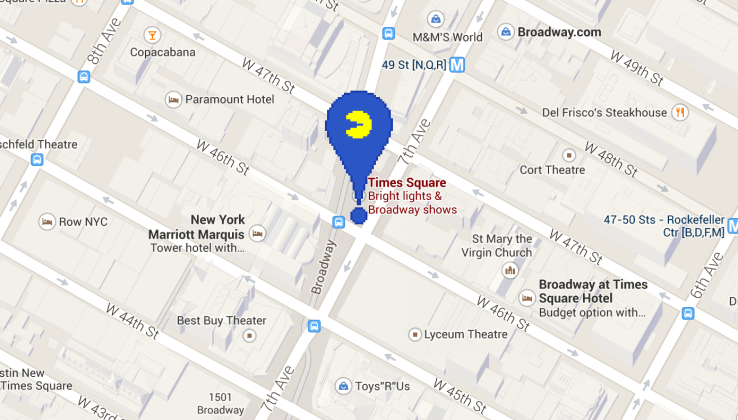
Google is offering hints to help you find the iconic 1980s video game protagonist, but if you’re in a hurry just search for “times square” and you should see a pixelated map flag icon like the one pictured here. Click on that and you’ll launch into a game with simple controls, letting you control Pac-Man as he evades his ghostly enemies with either the arrow keys on a computer or by swiping up, down, left and right to change direction on mobile.

Rack up a decent high score with your five lives and then share it with others to see how well you can Pac in the streets.

Source

Monday, January 5, 2015

Google's self-driving car not ready for the market

There’s no arguing that Google’s self-driving car is a thrilling development worthy of enthusiastic discussion, but there are a number of reasons to rain on this parade – rain itself, for one thing. That’s because the autonomous automobile has yet to prove that it can drive through heavy rain, not to mention snow, parking garages and many other everyday driving scenarios.

Despite the more than 700,000 miles Google’s self-driving cars have traversed so far, they still have many hurdles to overcome. While the cars can slow down or stop when traffic or obstacles are detected, they aren’t able to know if a new stoplight pops up overnight, according to the MIT Technology Review. The cars can detect and stop at unmapped stop signs, but a four-way stop may cause them to be overly slow and cautious.

Google’s self-driving cars have yet to prove they can handle other common driving scenarios (at least in some parts of the country): snow, heavy rain, open parking lots, multilevel parking garages and construction zones. Also, the cars’ sensors are blinded when the sun is directly behind a traffic light.

These issues and others remain unsolved because engineers haven’t gotten around to addressing them yet, according to Chris Urmson, director of the Google Self-Driving Car Project. Nevertheless, he expects solutions are “going to happen more quickly than many people think.”

Other automakers, including Nissan and Mercedes-Benz, haven’t been shy about their plans to manufacture autonomous cars. However, technological and financial limitations are putting heavy onus on the artificial intelligence behind the wheel, so to speak. We may still be a decade or so away from seeing self-driving cars in our blind spots.

Sunday, February 16, 2014

This Google chrome extension lets people see when you read their email


Bye bye, everyone. It's time to quit the Internet.

There's a Google Chrome extension called Streak that, when installed, lets you see when someone has read an email you sent. You know what this means? It meansother people can use Streak and see that you have opened their email without responding.

We're all doomed.

An email recipient doesn't have to have the plugin installed in order for the sender to be notified that it was opened. The recipient won't get any notification that you're tracking your emails, either. It's all very secretive.

The plugin is free and easy to install. Once you download it and give it access to your Gmail account, it will start automatically start tracking your outgoing messages.

If you send an email to multiple people, Streak will tell you how many people have viewed it, but won't necessarily reveal their identities.

Streak does a lot of other useful stuff, too. It's built as a tool for customer relationship management, and it can do things like schedule emails in advance. Streak has been around since 2012, but the read receipt feature was added in November.

Do read receipts sound familiar? They should, since they are a big part of BlackBerry's messaging service, BBM, and have been making people crazy for years. You can alsoenable read receipts in iMessage, though Apple makes the feature optional.

Another plugin, Boomerang, also offers users read receipts, but if you want to track an email, the recipient will be notified that it's being tracked with a line inserted at the end of the email.

Friday, January 31, 2014

Google hopes that designer frames will make Glass less dorky

Google
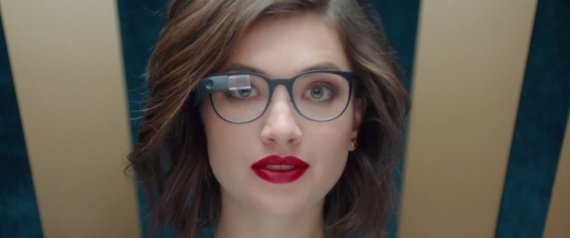
Google Glass is getting glasses.

Google is adding prescription frames and new styles of detachable sunglasses to its computerized, Internet-connected goggles known as Glass.

The move comes as Google Inc. prepares to make Glass available to the general population later this year. Currently, Glass is available only to the tens of thousands of people who are testing and creating apps for it.

Glass hasn't actually had glasses in its frame until now.

Glass is basically a small computer, with a camera and a display screen above the wearer's right eye. The device sits roughly at eyebrow level, higher than where eyeglasses would go.

It lets wearers surf the Web, ask for directions and take photos or videos. Akin to wearing a smartphone without having to hold it in your hands, Glass also lets people read their email, share photos on Twitter and Facebook, translate phrases while traveling or partake in video chats. Glass follows some basic voice commands, spoken after the words "OK, Glass."

The gadget itself is not changing with this announcement. Rather, Google plans to make various attachments available for people who wear glasses or sunglasses. Starting Tuesday, the Mountain View, Calif., company is offering four styles of prescription frames and two new types of shades available to its "explorers" — the people who are trying out Glass. The frames will cost $225 and the shades, $150. That's on top of the $1,500 price of Glass.

Users can take the frames to any vision care provider for prescription lenses. Google says it is working with insurance provider Vision Service Plan to train eye-care providers around the U.S. on how to work with Glass.

Google says some insurance plans may cover the cost of the frames. VSP, which covers 64 million people in the U.S., will also provide coverage for the frames and prescription lenses as part of its partnership with Google.

Isabelle Olsson, the lead designer for Google Glass, says the new frames open the spectacles up to a larger audience.

She demonstrated the new frames to The Associated Press last week at the Google Glass Basecamp, an airy loft on the eighth floor of New York City's Chelsea Market. It's one of the places where Glass users go to pick up their wares and learn how to use them. Walking in, visitors are greeted, of course, by a receptionist wearing Google Glass.

"We want as many people as possible to wear it," she said.

To that end, Glass's designers picked four basic but distinct frame styles. On one end is a chunky "bold" style that stands out. On the other is a "thin" design — to blend in as much as possible.

Olsson said Google won't be able to compete with the thousands of styles offered at typical eyeglasses stores. Instead, Glass's designers looked at what types of glasses are most popular, what people wear the most and, importantly, what they look good in.

The latter has been a constant challenge for the nascent wearable technology industry, especially for something like Google Glass, designed to be worn on your face. When Google unveiled Glass in a video nearly two years ago, it drew unfavorable comparisons to Bluetooth headsets, the trademarks of the fashion-ignorant technophile.

In designing Google Glass, Olsson and her team focused on three design principles with the goal of creating something that people want to wear. These were lightness, simplicity and scalability. That last one means having different options available for different people — just as there are different styles of headphones, from in-ear buds to huge aviator-style monstrosities.

Google Glass currently comes in five colors — "charcoal," a lighter shade of gray called "shale," white, tangerine and bright blue "sky." The frame attachments out Tuesday are all titanium. Users can mix and match.

"People need to be able to choose," Olsson said. "These products need to be lifestyle products."

Tuesday, January 21, 2014

Google testing a "smart" contact lens

Google unveiled Thursday a contact lens that monitors glucose levels in tears, a potential reprieve for millions of diabetics who have to jab their fingers to draw their own blood as many as 10 times a day.

The prototype, which Google says will take at least five years to reach consumers, is one of several medical devices being designed by companies to make glucose monitoring for diabetic patients more convenient and less invasive than the traditional finger pricks.

The lenses use a minuscule glucose sensor and a wireless transmitter to help those among the world’s 382 million diabetics who need insulin to keep a close watch on their blood sugar and adjust their doses.

The contact lenses were developed during the past 18 months in the clandestine Google X lab that also came up with a driverless car, Google’s Web-surfing eyeglasses (Google Glass) and Project Loon, a network of large balloons designed to beam the Internet to unwired places.

But research on the contact lenses began several years earlier at the University of Washington, where scientists worked under National Science Foundation funding.

“You can take it to a certain level in an academic setting, but at Google we were given the latitude to invest in this project,” said one of the lead researchers, Brian Otis. “The beautiful thing is we’re leveraging all of the innovation in the semiconductor industry that was aimed at making cellphones smaller and more powerful.”

American Diabetes Association board Chairman Dwight Holing said he’s gratified that creative scientists are searching for solutions for people with diabetes but warned that the device must provide accurate and timely information.

“People with diabetes base very important health-care decisions on the data we get from our monitors,” he said.

The device looked like a typical contact lens when Otis held one on his index finger. On closer examination, sandwiched in the lens are two twinkling glitter-specks loaded with tens of thousands of miniaturized transistors. It’s ringed with a hair-thin antenna.

“It doesn’t look like much, but it was a crazy amount of work to get everything so very small,” Otis said at Google’s Silicon Valley headquarters. It took years of soldering hair-thin wires to miniaturize electronics, essentially building tiny chips from scratch, to make what Otis said is the smallest wireless glucose sensor ever made.

Other non-needle glucose monitoring systems are also in the works, including a similar contact lens by Netherlands-based NovioSense, a minuscule, flexible spring that is tucked under an eyelid. Israel-based OrSense has already tested a thumb cuff, and there have been early designs for tattoos and saliva sensors.

A wristwatch monitor was approved by the FDA in 2001, but patients said the low-level electric current pulling fluid from their skin was painful, and it was buggy.

“There are a lot of people who have big promises,” said Dr. Christopher Wilson, CEO of NovioSense. “It’s just a question of who gets to market with something that really works first.”

Tuesday, January 14, 2014

Your Gmail account is become less private

If you're a Gmail user, you probably also have a Google+ account.

Until now, that likely meant nothing to you. However, with a new Gmail update, random people on Google+ will be able to send emails to your Gmail account without you ever having given them your email address, according to a new post on the Official Gmail Blog.

These messages from strangers will arrive in your Gmail inbox just like emails, but the stranger won't know your email address unless you respond. "Your email address isn't visible to a Google+ connection unless you send that person an email, and likewise, that person’s email address isn’t visible to you unless they send you an email," Google explains.

Here's what an email from a stranger will look like:


If you fear new people or believe that you're important enough that your inbox will get flooded once the new feature arrives, Google is offering an easy way to opt out. You'll have the option to limit who who can email you through your Google+ profile to "extended circles," "circles" or "no one":


Don't worry, though. Google says it will email you with a direct link to that setting once the changes go into effect.

Sure, strangers may be invading your inbox, but Google's been selling your email data to advertisers this whole time. It's up to you to decide which is scarier.

Monday, December 9, 2013

Forget Amazon's drones. Google can change the shipping industry with its self-driving cars

Amazon and UPS are investigating package delivery via automated flying drones, but a New York Times profile of Google's recent interest in robotics lays out an interesting hypothetical situation: imagine a self-driving car pulling up in your driveway, and a robot getting out to deliver your package instead of a living, breathing UPS human bedecked in brown.

While Google's self-driving cars are anything but common right now, there's overwhelming evidence to suggest the technology is realistic enough to one day seem safe and suitable to the public satisfaction.

And while the programming and intelligence necessary for a robot to make the walk from its autonomous car to your door while carrying your packages doesn't yet exist, it's far more likely that the engineers and roboticists at work on these types of problems will be able to solve them before Amazon's drones ever take to the skies with the government's blessing.

Don't agree? Nevada and Florida already legalized autonomous cars and legislation is underway in Michigan and California (Colorado's proposed legislation wasn't successfully passed). While the legal side of the self-driving car story is already underfoot, commercial drone certification isn't even slated to begin until 2020. Pair this with rapidly developing branches of robotics such as machine learning, and it seems like the robot delivery guy will beat the robot delivery helicopter to your door.

Source

Monday, September 16, 2013

Seven surprisingly gay-friendly companies


In a move that's quite shocking, considering their history with ripping off their employees in one way or another, Walmart has decided to join 2013 and is now offering health benefits to domestic partners of their employees. Yes, that's right; now same-sex couples can reap exactly what straight partners have been getting for years. Evolution is great.

Although it's been regarded as a historic move (and it is!), since it is Walmart after all, it should be noted that it's actually about dollars and cents. As Walmart's senior vice president Sally Welborn explained in a letter to the management of the retail stores:
It's a business decision, not a moral or political decision. We operate in 50 states, hundreds of municipalities and Puerto Rico, and as clarified under the Supreme Court’s decision to strike down section 3 of the Defense of Marriage Act (DOMA), each of these states are developing different definitions of marriage, domestic partner, civil union, etc. By developing a single definition for all Walmart associates in the U.S. and Puerto Rico, we are able to ensure consistency for associates across our markets. 
The Affordable Care Act (commonly referred to as "ObamaCare") inextricably linked health insurance with employment. As such, for our associates for whom we offer health insurance, we want to be sure we are providing access to as many individuals and their families as possible. 
Given the diverse world we live in today, a comprehensive benefit package that includes domestic partner benefits appeals to the contemporary workforce. Many companies, including most of our competitors, already offer spouse/partner benefits to their employees. Of 30 retail competitors, all but two (Publix and Stop and Shop union plan) provide either same- or opposite-sex domestic partner coverage.
Basically, it's not so much about supporting the LBGT community, as much as they want to save face in a changing world. However, if our gay and lesbian friends are getting the benefits they deserve, who are we to nitpick? And having such a big company, especially one that is seemingly unprogressive (they only sell censored music) in many ways, is hopefully what so many other companies need to get themselves in gear and do what’s right.

According to the Human Rights Campaign, who keeps their eyes on these things, 62 percent of Fortune 500 companies offer benefits to the domestic partners of their employees. So who else is on that list?

1. StarbucksNot only does the company offer benefits for same-sex partners, but last year it announced its support of gay marriage. The National Organization for Marriage, who has yet to get the memo of "live and let live" immediately launched a boycott. Although the first quarter after the announcement sales weren't exactly up to par, Starbucks didn't back down. Unlike Walmart who's adamant about their decision being a business one, Starbucks chief executive Howard Schultz said otherwise: "It is not an economic decision to me. The lens in which we are making that decision is through the lens of our people. We employ over 200,000 people in this company, and we want to embrace diversity. Of all kinds."

2. The Village VoiceThe iconic newspaper was launched by Norman Mailer and a few others in 1955 from a two-bedroom apartment in New York City's Greenwich Village. Always ahead of their time, the Voice was the very first privately owned company to offer domestic partner benefits to their employees. That was in 1982; it's sad that so many companies haven't taken a cue (and a clue) from this company who broke the ranks over 30 years ago.

3. GoogleAlways known for their diversity and quirky ways of running a company, Google is so gay friendly that it's going above and beyond. Not only do they offer benefits for the partners of same-sex couples, but a policy that went into effect in 2010, "will be compensating employees for taxes paid on domestic partners' health benefits — but only if they're gay."

4. Men’s WearhouseYou've seen the commercials: the mustached man comes on at the end to tell the consumer, "You’ll love the way you look. I guarantee it." Well, they guarantee a lot of things. Despite being based in Texas, a state notoriously known for squashing the rights of their residents, Men's Wearhouse not only offers benefits for domestic partnerships, but after five years, all employees get an automatic three weeks paid vacation. Sign me up!

5. General MillsThis company is winning all over the place. In addition to the adorable Cheerios commercial that featured an interracial couple that created a firestorm from racists everywhere, acceptance, in all its forms, is the name of the game at General Mills who also offers benefits to same-sex partners.

6. American ExpressI’ve had a beef with American Express since I realized that they have a fancy black AmEx that I'll probably never get my hands on. However, if I were their employee, I'd probably get better treatment. The huge credit card company offers benefits for same-sex partners, and also has a turnover rate of only 7 percent for full-timers. See? They totally treat their employees like royalty.

7. Marriott International With hotels all over the world, Marriott knows the best way to succeed with employees and patrons is to keep up with times. Yep, this one is on the list, too.

Thursday, July 25, 2013

What Google's Chromecast has that its competitors do not

Google announced a new Internet-to-television device called Chromecast, a well-developed area of technology that doesn't really need another gizmo. With Apple TV, Roku and Boxee all providing solutions to turn a regular old HDTV into an Internet-capable TV, you might be thinking that the Chromecast is an also-ran before it's even been released.

Yet Chromecast, as it's called, has the techies all giddy. A few of them said they already went on over to the Play store and bought one — before Google had even finished up its event. The general upshot of the stick is that it ports the television on your computer or smartphone — like Netflix, or YouTube — to your television. A lot of devices can already do this for you. So what makes this thing any different or better than all the others?

It's dirt cheap. The stick only costs $35. Roku's similar dongle-type streamer retails for $100. There's a huge mental difference between $100 and $35. It's easy to splurge on something that costs less than an Urban Outfitters shirt. In addition, Netflix users — new and existing — get three months of the streaming service free, essentially paying for most of the stick. (Three months of streaming costs, at minimum $24.)

It's teeny tiny. Most of these magic TV things come in box form. This is just a stick that goes into an HDMI port. There's also zero set-up. It just plugs in, you hook it up to your Wi-Fi and you tap a small button in compatible apps or the Chrome browser, and like magic it pushes that stuff to your TV.

It Has More Content Than Meets the Eye. The official Google partnerships don't amount to more than, say, Roku has on its box. The stick officially works with YouTube, Netflix, and Google Play Movies and TV. But there's a secret trick for getting all other web streaming services — like HBO GO (!) — from laptop to computer: Chrome tab projection. Per the demo, any tab open on the Chrome browser will play on the television. So, the HBO GO app might not work, but the desktop version will. Sure a computer connected by HDMI can do that, too. But this is a lot easier, smaller, and does a lot more (and again, no wires). Google has almost made available a software kit that will allow developers to add the functionality to their apps, meaning that, if the Chromecast catches on, you'll be able to beam video from any smartphone or tablet app directly to your television.

It Works with a Lot of Phones
. This works on both Android and iOS, meaning you can swap out phones or tablets or computers with different subscription services, or movies downloaded. It opens up a lot more content, and if you're making the switch from iOS to Android, you aren't stuck with a box that can't stream your smartphone content, like you would be with Apple TV.

It Turns (Almost) Every TV into a Smart TV. Any television with an HDMI port — so probably not that old clunker you bought on Craigslist — turns into a "smart" TV, with your phone or tablet or laptop as the remote control, allowing you to play videos, control volume, or even turn on the TV.

The whole thing makes watching TV from your phone or computer seamless and at $35 people who watch a lot of streaming TV from Netflix have almost no reason to buy it. Without the Chrome tab projection thing the whole offering gets a little less enticing. But at least for now it looks like a more elegant way to connect HDMI to multiple devices by just plugging in.

Source

Saturday, July 20, 2013

Insanely useful and simple Google Chrome hacks

1. Quickly see images in full size with the Hover Zoom extension.

Source: reddit.com

2. Get quick word definitions with just a double click by adding the Google Dictionary extension.


Add the extension here.
Source: chrome.google.com

3. Pin your most used tabs to the left to keep things clean and allow for more space.

To pin, just right click on the tab itself and select “Pin Tab.” They will be anchored to the left and the “X”s will disappear so you won’t accidentally close them, either.

4. Set a reminder for yourself from the search bar.

First, get the extension here. To set a reminder, type “tm” to activate the timer extension, then tab or spacebar, and finally the time and message. At the time you specify, you’ll get a desktop notification with your message.
Source: hongkiat.com

5. Use Incognito Mode for no-trace browsing.

You can open an incognito session by going to File -> New Incognito Window. A lot of people already use this for… lewd browsing, but it also comes in hand if you’re gift shopping for someone else and getting around some prominent paywalls.

Wednesday, June 5, 2013

13 iPhone Apps That Will Make Your Life Better

Waterin changes your life because it helps you to remember to drink more water. You can always use more water.

Price: Free

Sleep Pillow helps you get to sleep by playing soothing ambient sounds and mixes.

Price: $1.99

Burner creates a disposable phone number, so you never have to give your real number out.

Price: Free

Uber is an on demand car service. Vehicles typically arrive to pick you up in under seven minutes.

Price: Free

Postmates delivers anything to you within your city in under an hour.

Price: Free

With Cardmunch you'll never lose a business card again. The app snaps a photo and uploads the business card to LinkedIn so you can connect with the individual too.

Price: Free

Google Drive/Dropbox automatically saves all the photos on your device so you won't lose them. Plus you get storage space for other digital files.

Price: Free (Dropbox) & Free (Google Drive)

Dots is seriously one of the best iPhone games we've every played. It's highly addictive and challenging.

Price: Free

Google Search aka Google Now provides you with the most relevant information without you have to ask. For example, if you have an appointment the app will tell you when to leave so you'll make it on time.

Price: Free

With Spotify you'll never have to buy a song ever again.

Price: Free (a premium subscription is $9.99 per month)

Have you ever seen an article you want to read online but don't have time in that moment? Instapaper fixes that by saving full articles for you to read later.

Price: $3.99

Google Maps is probably the most useful app ever. How else would we find the nearest Chinese food restaurant?

Price: Free

Fantastical is the most useful calendar app. We love it because you can type in phrases like, "lunch with Megan tomorrow at 3 pm" and the app will fill the rest in for you.

Price: $4.99

Source

Thursday, December 13, 2012

Google Maps is back for Iphone

Everything you missed about Google Maps — street view, public transit, and accurate listings — is back on the iPhone with Google's new Maps app, which you can download here. (It curiously is for the iPhone only, not the iPad.)

There's a reason that Google's maps are better than basically anybody else's, as Alexis Madrigal extensively documented here, and why it'll take a long time for Apple's own mapping solution to catch up. The funny thing is that while catching up for Apple will require tons of money and data and work — things that take time! — Google's managed to rather quickly create a maps app that "matches (or beats, depending on your taste) Apple Maps in its speed, design, and overall aesthetics," by The Verge's judgment. Google had already won at data, and now it's matching or beating Apple on what is very much supposed to be its turf: design. And on Apple's own platform, no less.

The notion that "Google is getting better at design faster than Apple is getting better at web services" has huge implications, and we may well be about to cross the threshold where we really get to see exactly what that means.

Tuesday, July 24, 2012

You can go to Antarctica with google street view


Can't afford a trip to the South Pole? It's cool, neither can we. Fortunately, Google's got us covered. Today marks the launch of Google's extensive collection of panoramic street view imagery from Antarctica — including the most accurate, hi-res data available for some of the continent's most noteworthy destinations.
Writes Google Technical Program Manager Alex Starns:

Back in September 2010, we launched the first Street View imagery of the Antarctic, enabling people from more habitable lands to see penguins in Antarctica for the first time. Today we're bringing you additional panoramic imagery of historic Antarctic locations that you can view from the comfort of your homes. We'll be posting this special collection to our World Wonders site, where you can learn more about the history of South Pole exploration.


With the help of the Polar Geospatial Center at the University of Minnesota and the New Zealand Antarctic Heritage Trust, we've added 360-imagery of many important spots, inside and out, such as the South Pole Telescope, Shackleton's hut, Scott's hut, Cape Royds Adélie Penguin Rookery and the Ceremonial South Pole [pictured up top].

With this technology, you can go inside places like [Ernest Shackleton's] Hut [pictured here] and the other small wooden buildings that served as bases from which [Antarctic] explorers launched their expeditions... Now anyone can explore these huts and get insight into how these men lived for months at a time.

You can read more about the World Wonders Project and Google's ever-improving view of the South Pole here.

Source

Tuesday, July 10, 2012

Google launches campaign to legalize gay marriage across the globe


Today, Google has announced an ambitious effort to legalize same-sex marriage across the globe. The project, called “Legalize Love,” was annouced earlier today at an event in London focusing on LGBT issues in the workplace.

Dot429.com has the details:

The “Legalize Love” campaign officially launches in Poland and Singapore on Saturday, July 7th. Google intends to eventually expand the initiative to every country where the company has an office, and will focus on places with homophobic cultures, where anti-gay laws exist.

Google’s Mark Palmer-Edgecumbe outlined the initiative at a Global LGBT Workplace Summit in London earlier today. “We want our employees who are gay or lesbian or transgender to have the same experience outside the office as they do in the office. It is obviously a very ambitious piece of work.

Their strategy involves developing partnerships between companies and organizations to support grass-roots campaigns.

The project will initially focus on Poland and Singapore before expanding to other countries. Palmer-Edgecumbe explained that Google will impress on these countries that “being a global center and a world leader means you have to treat all people the same, irrespective of their sexual orientation.”

The initiative was immediately praised by representatives from Citi and Ernst & Young.


Source

Thursday, June 7, 2012

How to conquer your inbox

We've covered how to deal with all the email you're bombarded with and how to send email like a pro. Now let's think outside the (in)box.

Where Gmail Labs really starts to flex its muscle is in organizing your inbox:

Preview Pane — For people with larger monitors this makes email even more effortless. Mimicking traditional desktop email clients, half of your inbox is allocated to displaying a selected email and the other half is your inbox. This saves you a lot of clicks and attention switching over the course of the day. Plus, once enabled, it’s easy to turn off and on with a single click from the home screen. As someone who has a large monitor at work and a small monitor at home, this fast switching between Preview Pane mode and traditional inbox is very much appreciated.

Authentication Icon For Verified Senders — Years ago I got phished by a spammer pretending to be Paypal and knew immediately after it happened that I’d made a mistake. This Gmail Lab adds a little key icon to eBay and Paypal emails so you know you can trust those emails since eBay and Paypal are the senders spammers are most often trying to spoof.

Google Docs Previews In Mail — Read through full documents from inside your email. The fewer new windows I have to open, the better.

Video Chat Enhancements — If you video chat a lot you’ll appreciate the higher definition video quality this feature offers as well as early access to updates Google makes to the video chat interface.

Unread Message Icon — Adds the number of unread messages you have to the Gmail favicon (little envelope icon in your browser tab). As someone who regularly has 30+ tabs open, this handful of pixels is the only way I know whether I have new emails.

Mark As Read Button — “Tired of spending all that effort to click on the more actions menu every time you want to mark messages as read without reading them?” Yes, yes I do, snarky Google employee Mark K. Since I leave everything in my inbox, having a way to easily mark things as read is as important to me as easy archiving is to someone who empties their inbox.

Labels, Labels, Every Where; Not A Lot To Link
Like Priority Inbox, labels are a thing I find great in theory but which I never use in practice.

Nested labels were built for email shoguns like Gina Trapani. They are, hands down, the most thorough way of organizing your email. They also take so much work and so much thought that the prospect of even setting up the labels makes me want lie facedown in a puddle. Email ninjas use labels as little as possible. When you’re a smart searcher with good filters, labeling mostly is redundant. You don’t need a label called “Amazon” because every email from Amazon already has the word “Amazon” in it.

So when should you use labels?
To group a lot of different thing under one umbrella. If you’re working on a sprawling, specific project then labels are the best way to lash together a lot of otherwise disparate conversations. For example you might create a label called “renovation” to group together quotes from a designer, updates form a contractor, and ideas from your significant other.

To flag the most important conversations. My most used label is one called simply “Heart” where I file away my most personal and important conversations like a digital shoebox.

In either case, labels are best used sparingly; more scrapbooking than bookmarking.

“But how am I going to keep tabs on those routine but important emails I want to follow up with later or am waiting to hear back on?” Well, conscientious person I just made up, we’re going to use Superstars for that.
Superstars are better than labels because they take less work to set up, fewer clicks to apply and, most importantly, only one click to remove.

I like to use 4 stars: red-bang, purple-question, blue-info, and the good old yellow-star. These are both generic enough and intuitive enough that I actually use them.

Red-bang is for emails I want to keep at the forefront of my attention. Purple-question is for emails I need to follow up with. Blue-info is for emails I’m waiting for other people to follow up with. And yellow-star is of course the catch all. Gmail has 12 different stars so you can pick the assortment that makes the most sense to you.

But these stars are no good if you never see the emails you’re starring.

By Our Powers Combined: The Ultimate Inbox
Priority Inbox was devised to separate the important emails from the unimportant ones but the reason most people don’t use it is that they don’t want to take the chance of missing anything. Unlike search or other things Google has devised personalized results for, email is perceived as too important to trust to an algorithm.

So instead we’re going to design our own inbox that highlights important emails, as well as our specially starred emails, all while keeping our undiluted inbox paramount.

We accomplish this email wizardry with a Gmail Labs feature called Multiple Inboxes. Once you have multiple inboxes enabled, go to the new Multiple Inboxes tab in Settings and let’s start configuring it.


What would you like in each inbox?

is:important — Your hand-rolled priority inbox that sits alongside your regular inbox rather than dominating it. Like with Priority inbox, you can mark things important or not important to better train Gmail to your priorities.

circle:family — Never lose track of an email from your friends, family, bosses, or subordinates again by keeping a separate inbox with all the emails from your most important groups. Here’s how to set up circles in Gmail.

has:purple-question — Keep your important emails close, but keep the emails you need to follow up on even closer.

deliveredto:techbrodudes+ipadgiveaway@gmail.com — Filter your specialty inbound email so that it skips your main inbox and lands in a separate, equally visible inbox.

Source
Thursday, May 10, 2012

Google's driverless car takes a blind man for a spin


If you want to salute, race or flirt with other drivers in Nevada, you could soon be out of luck with some cars.

That's because on Monday, Nevada became the first to approve a license for "autonomous vehicles" -- in other words, cars that cruise, twist and turn without the need for a driver -- on its roads.

The license goes to Google, the Silicon Valley technology giant known more for its search engine and e-mail service that nonetheless has been known to dive into other big ideas such as space elevators to Internet-enabled glasses.

In a 2010 post on Google's official blog, engineer and Google X founder Sebastian Thrun said that the self-driving vehicle project aims "to help prevent traffic accidents, free up people's time and reduce carbon emissions by fundamentally changing car use."

He noted that the "automated cars use video cameras, radio sensors and a laser range finder to 'see' other traffic, as well as detailed maps ... to navigate the road ahead." There is no driver needed, though one is typically in the front seat ready to take control if need be.

Earlier this spring, Google said it had "safely completed over 200,000 miles of computer-led driving."

Monday marked a new milestone for the project, when Nevada issued a special license after demonstrations on state freeways, state highways, in Carson City neighborhoods and on Las Vegas' landmark Las Vegas Strip, the state's Department of Motor Vehicles said in a news release.

The new plate is red and features the infinity symbol and the letters AU, for autonomous vehicle. All such cars on the road are "test" vehicles for now, though the state signaled it intends to be "at the forefront of autonomous vehicle development."

"I felt using the infinity symbol was the best way to represent the 'car of the future,' " state DMV Director Bruce Breslow said. "When there comes a time that vehicle manufactures market autonomous vehicles to the public, that infinity symbol will appear on a green license plate."

Google was the first company to apply to test its self-driving system in Nevada, the state said, while indicating that "other auto manufacturers have indicated their desire to test and develop" such technology in the state.

Source

Saturday, April 28, 2012

Google unveils it's file storage service


Google’s long-awaited cloud-based storage solution, Google Drive, has officially launched.

Google Drive integrates with Google Apps, so in addition to storing any file, it will also let you open videos, photos, PDFs, and Google Docs.

The service is offering free 5GB accounts for all users, with the option to upgrade to 25GB for $2.49/mo., 100GB for $4.99/mo., or 1TB for $49.99/mo. Paid accounts also come with 25GB of Gmail storage.

Drive is also an open platform, with a selection of third-party apps available in Google’s Chrome Web Store.

Source